
How I won the Dyalog Programming Contest

Blog post from Arianna Locatelli’s presentation on how she won the Dyalog APL programming contest 2015.

By Vibeke Ulmann #Dyalog15

Introduction

Now it it’s 7th year, the annual Dyalog APL Programming Contest continues to attract a lot of interest. One of our favourite sessions at the Annual User Meeting, is when we get the opportunity to meet the winners, and hear how they won the Grand Prize.

Again this year we collaborated with SQORE/Studentcompetitions, and the contest had 2 phases.

  • Phase 1 had 10 ‘simple’ one liner style problems
  • Phase 2 had low, medium and difficult problems.

This year we had 1786 registrants, 42 submissions for Phase 1 and 16 submissions for Phase 2. We had participants from all over the globe – perhaps with the exception of Antartica.

A deep felt THANK YOU goes to our sponsors: APL Italiana, Dyalog APL, Fiserv, and SimCorp, as well as a number of sponsors who prefer to remain anonymous.

The Winner

Arianna Locatelli is 17 years old and is currently a fourth year student in Liceo Classico S. M. Legnani, in Saronno, a little town near Milan. She was one of the students who took part in Roberto Minervini’s Dyalog APL class at her school. Reference Blog post  How to Save an Italian School with APL.
Competition winner gets certificate

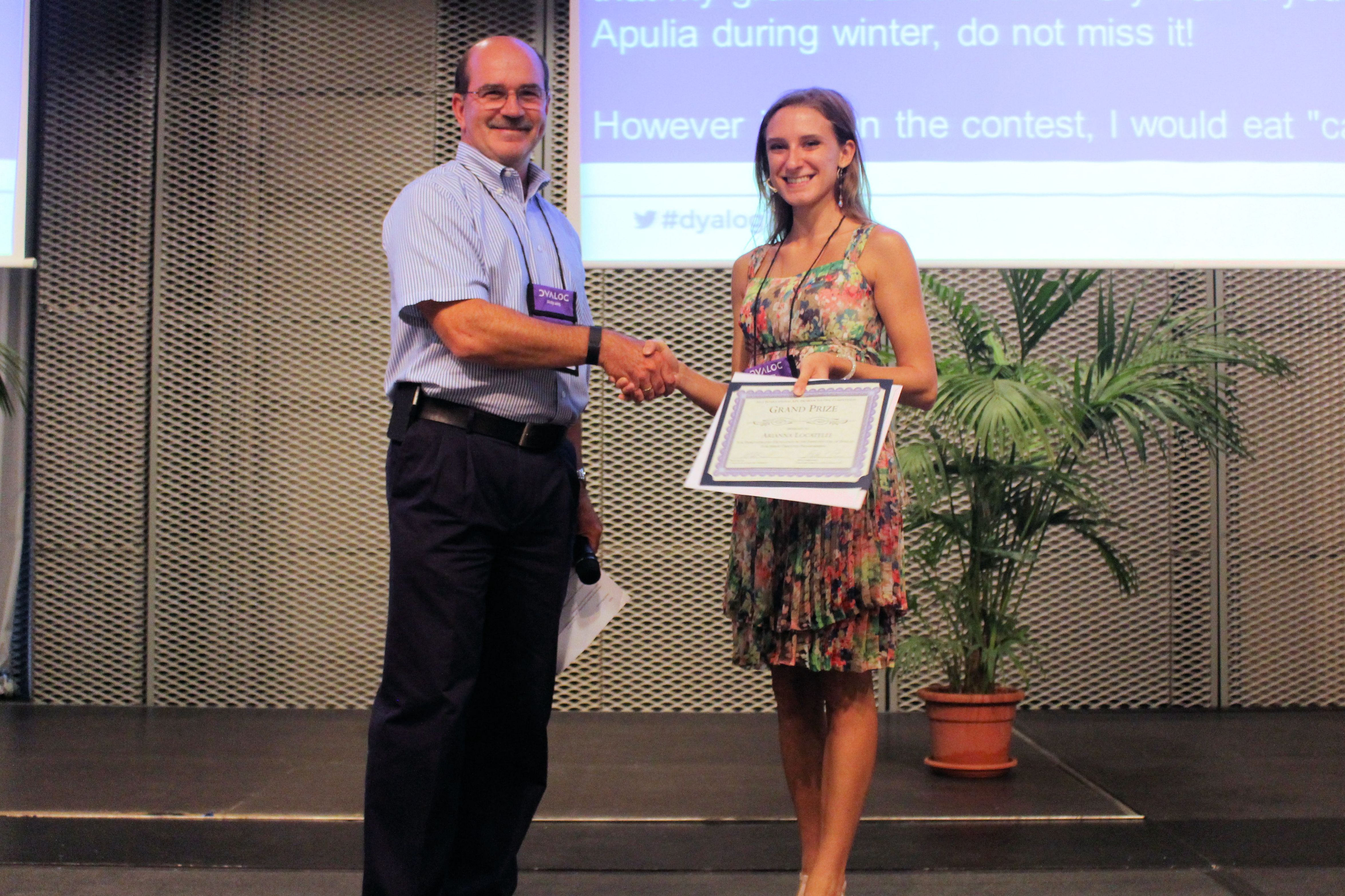
Arianna was presented with her winner Certificate by Walt Syzonenko from Fiserv

Despite the fact that Arianna’s main interest is in humanistic subjects, especially Latin and ancient Greek, and despite the fact that informatics is not taught in her school, she took at keen interest in learning the Dyalog APL language – so much so – that when her teacher Roberto Minervini encouraged her to sign up for the 7th Programming Contest,  she took on the challenge.

“As a high School student I thought I had little chance of winning. I thought there would be an unbreachable gap between the humanistic subjects I favour, and Dyalog APL. But I discovered that abtract thinking and understanding, as well as discussing some of the problems in the contest with my fellow students made this a very interesting experience.I also found Bernard Legrands book Mastering Dyalog APL (http://www.dyalog.com/mastering-dyalog-apl.htm), as well as using the Internet very useful.” Arianne said when she started her presentation.

She then processed to give a us  a truly fluent presentation, first presenting the logical solution to a problem then the APL implementation. It was particularly impressive to see how her thought processes led her to master some of the tasks with the highest degree of difficulty and complexity in Phase 2.

Asked about her favourite APL expression – without hesitation she said:  *Find*.

We all congratulate Arianne with her winning submission – which is particularly impressive considering her young age.  We hope that although it is her intention to study humanistic subjects, she will be able to find topics which will encourage her to continue to use the Dyalog APL language.

Solving the 2014 APL Problem Solving Competition – How Tweet It Is

This post is the continuation of the series where we examine some of the problems selected for the 2014 APL Problem Solving Competition.

The problems presented in Phase 1 of the competition were selected because they could be solved succinctly, generally in a single line of APL code. This makes them well suited for experimentation on TryAPL.org.

Problem 2 of Phase 1, entitled “How tweet it is” reads

“Twitter messages have a 140 character limit – what if the limit was even shorter? One way to shorten the message yet retain most readability is to remove interior vowels from its words. Write a dfn which takes a character vector and removes the interior vowels from each word.”

Test cases:
      {your_solution} 'if you can read this, it worked!'
if yu cn rd ths, it wrkd!
      {your_solution} 'APL is REALLY cool'
APL is RLLY cl
      {your_solution} '' ⍝ an empty vector argument should return an empty vector

      {your_solution} 'a' ⍝ your solution should work with a single character message
a

We’ll examine a couple of approaches to this problem – one that’s more “traditional APL” code, and another that makes use of a really helpful Dyalog feature.

This problem could be restated as “find and remove the vowels that aren’t at the beginning or end of a word”. To start with, we need to determine where the words are and where the vowels are. A word is a contiguous set of letters; multiple words are separated by spaces or punctuation. For simplicity’s sake, we’ll ignore contractions and possessives.

The “Traditional APL” Approach

This approach employs a technique that is not commonly found outside of APL and its brethren – using a Boolean vector to determine which elements to remove or keep. First, let’s find where all the vowels are:

      string←'If you can read this, it worked!'
      vowels←{⍵∊'aeiouAEIOU'}
      vowels string
1 0 0 0 1 1 0 0 1 0 0 0 1 1 0 0 0 0 1 0 0 0 1 0 0 0 1 0 0 1 0 0

To help illustrate what’s happening, I’ll write a little operator called “show” to compactly display the string, the Boolean vector, and the elements that would be selected by applying the Boolean to the string.

      show←{⍵⍪⍵{↑(1 0⍕ ⍵)(⍵\⍵/⍺)}⍺⍺ ⍵}
      vowels show string
If you can read this, it worked!
10001100100011000010001000100100
I   ou  a   ea    i   i   o  e

Next we want to remove vowels that aren’t at either end of a word. First, find where the words are by finding where the letters are.  There are several ways to do this; the most obvious may be to use a character vector constant:

      letters←{⍵∊'abcdefghijklmnopqrstuvwxyzABCDEFGHIJKLMNOPQRSTUVWXYZ'}

Long character constants seem a bit awkward to me.  So, another technique uses the Unicode Conversion system function to return the 26 characters starting at the code points for each of ‘a’ and ‘A’:

      letters←{⍵∊⎕UCS (⍳26)∘.+¯1+⎕UCS'aA'}

Yet another way might be to use the code point values directly and do numerical operations:

      letters←{{((⍵≥65)∧⍵≤90)∨(⍵≥97)∧⍵≤122}⎕UCS ⍵}

Which technique you choose is largely a matter of taste and style. All three return the same result and have comparable performance. My personal preference is the second one – it has fewer characters for me to mistype 🙂

      letters show string
If you can read this, it worked!
11011101110111101111001101111110
If you can read this  it worked 

So now let’s mark the interior letters of the words. This employs a technique known as shift and compare that I learned in the early 1980s when I was privileged to work with Bob Smith. Among Bob’s many contributions to the APL world was a book on Boolean Functions and Techniques. To mark the interior letters, we’ll do both a right and left shift:

      interior←{⍵∧(¯1↓0,⍵)∧1↓⍵,0}
      {interior letters ⍵} show string
If you can read this, it worked!
00001000100011000110000000111100
    o   a   ea   hi       orke  

The last step is to find interior vowels and negate:

      {(vowels ⍵)∧interior letters ⍵} show string
If you can read this, it worked!
00001000100011000010000000100100
    o   a   ea    i       o  e  

      {(vowels ⍵)⍲interior letters ⍵} show string
If you can read this, it worked!
11110111011100111101111111011011
If y u c n r  d th s, it w rk d!

Putting it all together…

      tweet←{⍵/⍨~(⍵∊'aeiouAEIOU')∧{(1↓⍵,0)∧¯1↓0,⍵}⍵∊⎕UCS(⍳26)∘.+¯1+⎕UCS'aA'}
      tweet string
If yu cn rd ths, it wrkd!

The Other Technique – Using Regular Expressions

In version 13.0, Dyalog introduced the system functions ⎕S and ⎕R as interfaces to the PCRE (Perl Compatible Regular Expression) library. Like APL, regular expressions may seem a bit alien at first, but in the years since their incorporation into Dyalog, I’ve grown to appreciate their power and flexibility – they can frequently accomplish complex string manipulations more succinctly than their APL equivalents thus furthering Dyalog’s power as a tool of thought, notation and execution.

      tweet←{('\B[AEIOU]\B' ⎕R '' ⍠ 1) ⍵}
      tweet string
If yu cn rd ths, it wrkd!

The expression above replaces any vowel (⍠ 1means case-insensitive) that is not at the beginning or end of a word with the empty vector, effectively removing the interior vowels. A blog post is not enough space to give an adequate overview of regular expressions. But I hope the expression above piques your interest and encourages you to experiment with ⎕S and ⎕R on TryAPL.org or with a Dyalog system of your own.

Solving the 2014 APL Problem Solving Competition – It’s All Right

This post is the continuation of the series where we examine some of the problems selected for the 2014 APL Problem Solving Competition.

The problems presented in Phase 1 of the competition were selected because they could be solved succinctly, generally in a single line of APL code. This makes them well suited for experimentation on TryAPL.org.

pythProblem 1 of Phase 1, entitled “It’s all right” reads,

“Write a dfn that takes the length of the legs of a triangle as its left argument, and the length of the hypotenuse as its right argument and returns 1 if the triangle is a right triangle, 0 otherwise.”

Test cases:
      3 4 {your_solution} 5
1
      2 3 {your_solution} 4
0

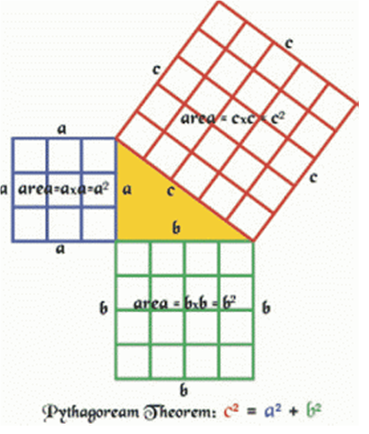
This uses the Pythagorean theorem – A² + B² = C². It’s trivial to implement an almost direct translation of this in APL – in a dfn, using ⍺[1] for A, ⍺[2] for B and for C yields:

right←{((⍺[1]*2)+(⍺[2]*2))=⍵*2}

This seems rather clunky though… what if we consider the problem as “Are the sums of the squares of each argument equal?” To get the sum of the squares, first we can use the composition *∘2 (composing the power function * with the constant 2) to mean “square” and +/ to mean “sum”, and combine them in a 2-item function train (also known as an “atop”): ((+/)*∘2)

then apply this to each argument:   ((+/)*∘2)¨⍺ ⍵

and compare the results for equality, resulting in the dfn:

right1←{=/((+/)*∘2)¨⍺ ⍵}

Still this seems clunky to me. Let’s see…squaring a number is just multiplying the number by itself, so, if we use the monadic commute operator with multiplication,   ×⍨
we get the equivalent of squaring. Then we can use that function in an inner product with addition to also get “sum of the squares”:   +.×⍨

The rest is essentially the same as in right1 above:

right2←{=/+.×⍨¨⍺ ⍵}

All three of these solutions solve the contest problem. The first one, right, is not commutative though – the legs of the triangle must be supplied as the left argument. However, right1 and right2 are commutative and the order of arguments is not significant.

Solving the 2014 APL Problem Solving Competition – Cryptography Problem 3

This post is the continuation of the series where we examine some of the problems selected for the 2014 APL Problem Solving Competition. In this post we’ll conclude looking at the cryptography problems from Phase II that we started looking at in a previous blog post and continued in a further blog post.

Cryptography Problem 3 – Playfair Cipher

Task 1 – Squaring Off

The first task is to convert a string into a 5×5 Playfair table. The solution makes straightforward use of APL primitives:

  • Unique () to remove duplicate characters from the string.
  • Without (~) to find the rest of the alphabetic characters that are not mentioned in the string, and again to remove the character J.
PlayfairTable←{
    k←∪⍵
    5 5⍴(k,⎕A~k)~'J'
}

Here it is in action:

      ⊢table←PlayfairTable'KENNETHEIVERSON'
KENTH
IVRSO
ABCDF
GLMPQ
UWXYZ

Task 2 – Encryption

To encrypt a message we need to take two characters at a time, find their coordinates in the 5×5 Playfair table, swap their column coordinates and look up the letters at the new coordinates. There are lots of tricks in the code below of which we’ll describe just a few:

  • To process the message two characters at a time, appending to the result as we go, we use a tail-recursive dfn whose left argument accumulates the result. For an introduction to this technique see this implementation of the Fibonacci function.
  • To find letters in the Playfair table we first look them up in the ravel (i.e. the linearised form) of the table, and then use Encode () to convert this linear index into a pair of coordinates. Decode () does the opposite, converting a pair of coordinates back into a linear index.
  • Mix () and Split () are used to convert between two different representations of the coordinates of the two characters we’re encoding: either as a flat 2×2 matrix, or as a nested 2-vector of 2-vectors. The choice of representation is largely a matter of taste, and it might be fun to play with this part of the code. You could tweak it to work entirely with the flat representation, or entirely with the nested representation, rather than converting back and forth between them.
PlayfairEncrypt←{
    ⎕IO←0                       ⍝ To aid arithmetic modulo 5.
    t←⍺                         ⍝ The Playfair table.
    m←⍵,(2|≢⍵)/'Z'              ⍝ Add a Z if the message length is odd.
    ((m='J')/m)←'I'             ⍝ Convert J to I in the message.
    ''{                         ⍝ Start with an empty accumulator.
        0=≢⍵:⍺                  ⍝ Finished: return the accumulated encrypt.
        1=≢⍵:⍺ ∇ ⍵,'X'          ⍝ Only one character left: add an X.
        p←2↑⍵
        =/p:⍺ ∇(⊃⍵),'X',1↓⍵     ⍝ Duplicate character: insert an X.
        c←(⍴t)⊤(,t)⍳p           ⍝ Coords of each letter in the table.
        c←{
            =/1↑⍵:↑(⍴t)|0 1+↓⍵  ⍝ Same row: move to the right.
            =/1↓⍵:↑(⍴t)|1 0+↓⍵  ⍝ Same column: move down.
            0 1⌽⍵               ⍝ Else swap column coords.
        }c
        p←(,t)[(⍴t)⊥c]          ⍝ Look up new coords in table.
        (⍺,p)∇ 2↓⍵              ⍝ Tail recursion.
    }m
}

Here it is in action:

      ⊢cipher←table PlayfairEncrypt'HELLOWORLD'
KNMWQVZVVMCY

(Note that this result is slightly different from that given in the original problem description, because of some confusion about the rules for handling duplicate letters and odd message lengths, which were clarified later in the student competition forums.)

Task 3 – Decryption

Decryption is very similar to encryption. The differences are:

  • Letters found in the same row of the table need to move left instead of right, and letters in the same column need to move up instead of down.
  • We don’t need to worry about the input having an odd length, or containing the letter J.

Hence the code for PlayfairDecrypt is shorter than but very similar to PlayfairEncrypt:

PlayfairDecrypt←{
    ⎕IO←0                       ⍝ To aid arithmetic modulo 5.
    t←⍺                         ⍝ The Playfair table.
    ''{                         ⍝ Start with an empty accumulator.
        0=≢⍵:⍺                  ⍝ Finished: return the accumulated encrypt.
        p←2↑⍵
        c←(⍴t)⊤(,t)⍳p           ⍝ Coords of each letter in the table.
        c←{
            =/1↑⍵:↑(⍴t)|0 ¯1+↓⍵ ⍝ Same row: move to the left.
            =/1↓⍵:↑(⍴t)|¯1 0+↓⍵ ⍝ Same column: move up.
            0 1⌽⍵               ⍝ Else swap column coords.
        }c
        p←(,t)[(⍴t)⊥c]          ⍝ Look up new coords in table.
        (⍺,p)∇ 2↓⍵              ⍝ Tail recursion.
    }⍵
}

Here it is in action:

      table PlayfairDecrypt cipher
HELXLOWORLDX

Solving the 2014 APL Problem Solving Competition – Cryptography Problem 2

This post is the continuation of the series where we examine some of the problems selected for the 2014 APL Problem Solving Competition. In this post we’ll continue looking at the cryptography problems from Phase II that we started looking at in a previous blog post.

Cryptography Problem 2 – Book Cipher Variation

Task 1 – Let’s Get Normal

The first task is to normalise some text by weeding out non-alphabetic characters, collapsing consecutive spaces and converting to upper case. It’s possible to do this all by hand with APL, but it’s much easier to use the ⎕R operator to search for and replace regular expressions.

Taking the transformations in turn, here’s how to convert non-alphabetic characters in message to spaces:

('[^[:alpha:]]'⎕R' ')⍵

Here’s how to convert multiple consecutive spaces to a single space:

(' +'⎕R' ')⍵

And here’s how to convert every alphabetic character to upper case:

('.'⎕R'\u&')⍵

We can combine the first two of these, by converting any sequence of one or more non-alphabetic characters to a single space, giving the following implementation:

Normalise←{
    text←⎕SE.UnicodeFile.ReadText ⍵
    ('[^[:alpha:]]+' '.'⎕R' ' '\u&'⍠'Mode' 'D')text
}

The option 'Mode' 'D' tells ⎕R to operate in Document mode, which processes the whole file at once instead of line by line, as we are not interested in preserving the original line breaks. Here it is in action:

      70↑bor←Normalise'/home/jay/Desktop/BillOfRights.txt'
THE PREAMBLE TO THE BILL OF RIGHTS CONGRESS OF THE UNITED STATES BEGUN

Task 2 – Encryption

In this cipher there are lots of different ways of encoding each character of the message, and we are free to pick any of them. In order to try to “minimise the number of duplicated pairs in the result”, we simply pick randomly whenever we have a free choice. The function pickone helps with this. Given a boolean vector, it first uses {⍵/⍳⍴⍵} to get a vector of the indices of all the 1 bits, and then uses {⍵[?≢⍵]} to choose one of these indices at random.

In this coding of BookEncrypt, the anonymous inner dfn encodes a single character of the message into a (word offset) pair. These pairs are joined together with ⊃,/, a common pattern for catenating strings. The Disclose is required because, in Dyalog, reduction always reduces the rank of its argument, so ,/ on a vector of strings returns a scalar: the enclose of the catenated strings.

BookEncrypt←{
    pickone←{⍵[?≢⍵]}∘{⍵/⍳⍴⍵}
    b←' ',⍺                     ⍝ b has a space wherever a word starts in the key.
    s←{⍵/⍳⍴⍵}b=' '              ⍝ Get the indices of all the word starts.
    ⊃,/{
         p←pickone b=⍵          ⍝ Choose a random occurrence of letter ⍵
         p-←s                   ⍝ and get its offset within each word.
         w←pickone{(0<⍵)∧⍵≤20}p ⍝ Choose a word with a reasonable offset
         w(p[w])                ⍝ and return the (word offset) pair.
    }¨⍵                         ⍝ ... for each letter in the message.
}

Here it is in action:

      ⊢cipher←bor BookEncrypt 'MYSECRETMESSAGE'
480 11 523 11 440 6 115 5 78 16 579 18 696 20 330 16 544 4 658 17 400 9 661 11
      246 18 186 4 482 13

Task 3 – Decryption

Decryption is simpler then encryption, because there is no need to make random choices. All we have to do is:

  • Find the index of the start of each word in the key, as before.
  • Split the input into pairs of numbers.
  • For each pair, find the character in the key at the specified offset from the start of the specified word.

There are various ways to split the input into pairs of numbers. Here, we do it with the Rank operator (). Encrypting an N-character message gives a vector of 2×N numbers. To split it into pairs we first reshape it into a matrix with N rows and 2 columns; and then use f⍤1 to apply f to the rank-1 subarrays of this matrix, which are its row vectors.

Here’s the code:

BookDecrypt←{
    b←' ',¯1↓⍺                  ⍝ b has a space wherever a word starts in the key.
    s←{⍵/⍳⍴⍵}b=' '              ⍝ Get the indices of all the word starts.
    {
        (w o)←⍵                 ⍝ Get word number and offset
        b[s[w]+o]               ⍝ and find the character at that position
    }⍤1⊢(0.5×≢⍵)2⍴⍵             ⍝ ... for each pair of numbers in the input.
}

And here it is in action:

      bor BookDecrypt cipher
MYSECRETMESSAGE

To be continued…

Solving the 2014 APL Problem Solving Competition – Cryptography Problem 1

This post is a continuation of the series where we examine some of the problems selected for the 2014 APL Problem Solving Competition. I’ll start by looking at the cryptography problems from Phase II.

Cryptography Problem 1 – Vigenère Cipher

The cipher is described using a large table of letters, but you don’t need to create this table in APL. Instead, you can convert each letter of the key and the corresponding letter of the message to numbers; add them together; and then convert the result back to a letter. Some subtleties:

  • We want the result of the addition to “wrap around” at the end of the alphabet, so 25 + 1 = 26 (Z) but 25 + 2 = 27 which should wrap round to 1 (A). This is called modular arithmetic.
  • We can implement modular arithmetic easily using APL’s Residue primitive, but this works most naturally when the alphabet is numbered from 0 to 25, rather than from 1 to 26. To use 0-based numbering, I’ll set ⎕IO←0 in the code below.
  • An idiomatic way of converting letters to numbers is to look them up in the ⎕A, the upper case alphabet: ⎕A⍳⍵. To convert the other way we can simply index into ⎕A: ⎕A[⍵]. (For more comprehensive conversions between characters and numbers see the ⎕UCS system function.)

The code is then straightforward:

VigEncrypt←{
    ⎕IO←0                       ⍝ use 0-based numbering
    key←(⍴⍵)⍴⎕A⍳⍺               ⍝ convert key to numbers and expand to length of message
    ⎕A[26|(⎕A⍳⍵)+key]           ⍝ add key to message and convert back to characters
}

To encrypt the message we added the key (modulo 26). To decrypt, we need to subtract the key (modulo 26) instead, so we can go from VigEncrypt to VigDecrypt just by changing one character in the code. Note that the result of the subtraction might be negative, but Residue (unlike the remainder or modulo operations in some other programming languages you may have used) will still give us the correct result in the range 0 to 25. For example, 26|¯3 is 23.

VigDecrypt←{
    ⎕IO←0                       ⍝ use 0-based numbering
    key←(⍴⍵)⍴⎕A⍳⍺               ⍝ convert key to numbers and expand to length of message
    ⎕A[26|(⎕A⍳⍵)-key]           ⍝ subtract key from message and convert back to characters
}

Here are the functions in action:

      key←'KEIVERSON'
      key VigEncrypt'APLISFUNTOUSE'
KTTDWWMBGYYAZ
      key VigDecrypt key VigEncrypt'APLISFUNTOUSE'
APLISFUNTOUSE

To be continued…